

Table of Contents
- What Cryptocurrency Wallets Are and How They Work
- Hot Wallet vs Cold Wallet: Which Is Right for You
- Hardware Wallet Setup Guide: Step-by-Step
- How to Store Bitcoin Safely and Protect Your Assets
- Protecting Your Crypto Wallet Recovery Phrase
- Private Keys, Public Addresses, and Security Threats
- Common Mistakes Beginners Make with Secure Crypto Storage
- Frequently Asked Questions
Last Updated: October 18, 2026
What Cryptocurrency Wallets Are and How They Work
A cryptocurrency wallet is a digital tool that stores your private keys and public addresses, enabling you to send, receive, and manage your crypto holdings. Your public address works like an email (anyone can send you funds), while your private keys are the passwords that unlock those funds.
Wallets come in two main categories based on how they store your keys. Cold wallets keep your keys offline, which is why they're considered the gold standard for secure crypto storage. ACM Digital Library research on cryptocurrency user security practices found that users who prioritize security consistently choose offline storage methods.
Your private key is everything. If someone gains access to it, they control your funds instantly and permanently. There's no password reset, no customer service recovery, no insurance, the responsibility falls entirely on you.
At The Crypto Merchant, we help new investors understand these fundamentals so they can make confident decisions about which wallet type fits their needs and risk tolerance.
Hot Wallet vs Cold Wallet: Which Is Right for You
The choice between a hot wallet and a cold wallet comes down to how you plan to use your crypto.
Hot wallets excel at speed and accessibility: send funds in seconds, check balances anytime, manage multiple assets from one interface. But every internet connection is a potential attack vector, and hackers, malware, and phishing schemes target hot wallet users constantly.
Cold wallets eliminate online exposure entirely. Your private keys never touch the internet, and transactions require physical confirmation on the device itself, so a hacker thousands of miles away cannot authorize a transfer no matter what they do to your computer.
The practical framework: use a hot wallet for crypto you plan to trade or spend within the next month, and keep everything else in cold storage.
Hardware Wallet Setup Guide: Step-by-Step
A hardware wallet is a physical device, roughly the size of a USB drive, that stores your private keys offline and signs transactions without ever exposing those keys to your computer or phone. Setting one up properly is the foundation of secure crypto storage for beginners.
 BitBox02View product
Choosing Your First Hardware Wallet
Your first hardware wallet should prioritize ease of use without sacrificing security. The Ledger Academy comparison of hardware wallet options emphasizes that beginner-friendly devices should offer clear on-device confirmation screens, straightforward setup processes, and broad asset support.
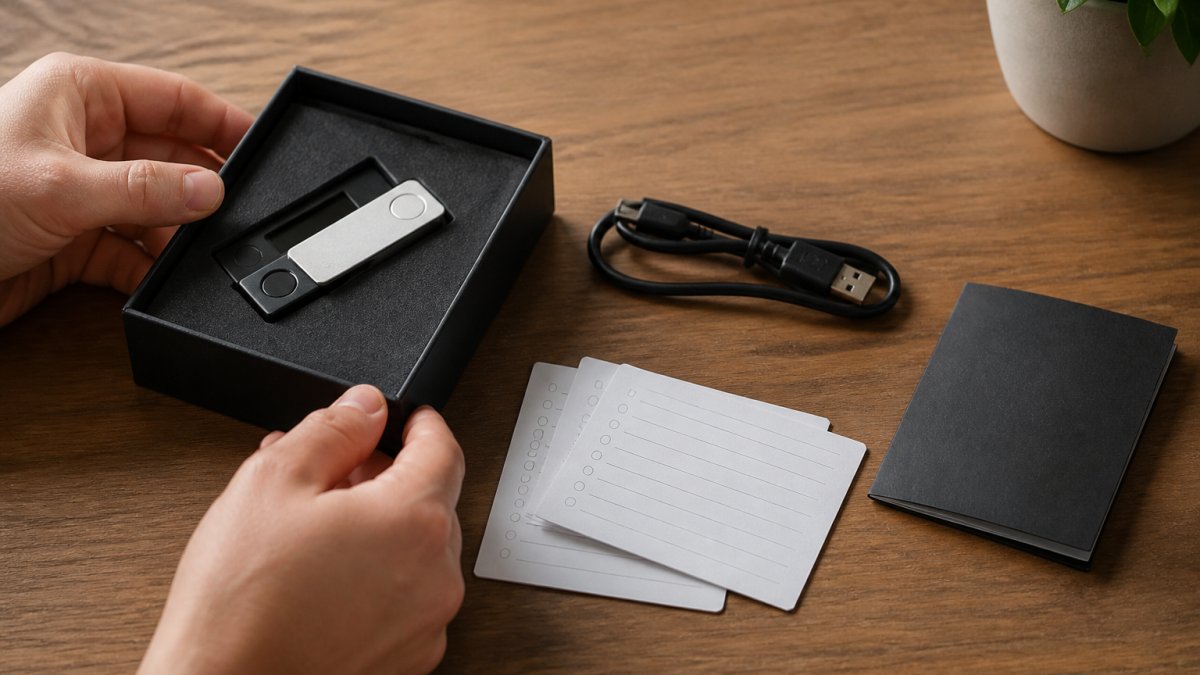
The Trezor Model One is an excellent starting point. At $29.00, it includes the device, a USB cable, two backup cards for your recovery phrase, and clear setup instructions.

The Ledger Nano S Plus ($59.00) is another solid choice, especially for managing many assets.
For a premium experience, the BitBox02 Hardware Wallet by Shift Crypto ($149.99) offers Swiss engineering and a touch-based interface. It automatically backs up your seed phrase to a microSD card, reducing the risk of handwriting errors.
Initial Setup and Verification
Once you've chosen your hardware wallet, connect it to a computer via USB and follow the manufacturer's setup wizard. You'll create a PIN (a numeric password for device access) and generate your recovery phrase, typically a 24-word sequence that can restore your wallet if the device is lost or damaged.
This is critical: write down your recovery phrase exactly as displayed on the device's screen. Do not type it into your computer. Do not photograph it. Do not email it to yourself. Use pen and paper, verify each word carefully, and store the physical backup somewhere secure.
After setup, test your wallet with a small transaction before depositing significant funds. Send a tiny amount of crypto to your new wallet and confirm it arrives, this validates your setup and your understanding of the process before you commit larger amounts.
How to Store Bitcoin Safely and Protect Your Assets
Storing Bitcoin safely means understanding the specific threats to your holdings and building defenses against each one. The most common threats are hacking (unauthorized access to your private keys), physical theft (someone stealing your hardware wallet or backup), loss (you forgetting where you stored your recovery phrase), and human error (writing down your seed phrase incorrectly).

For Bitcoin specifically, hardware wallets are the standard approach. Bitcoin was designed for self-custody, and unlike some newer cryptocurrencies that offer recovery mechanisms or account freezes, it offers no safety net if you lose your private key or someone steals it, both its greatest strength and its greatest responsibility.
The setup process for Bitcoin is identical to any other asset: connect the device, generate a recovery phrase, verify it, and test with a small transaction. Once you've confirmed your wallet is working, move your Bitcoin to the hardware wallet and leave it there, each transaction is an opportunity for error.
One often-overlooked step is address verification. When you initiate a Bitcoin withdrawal from an exchange, verify the receiving address on your hardware wallet's screen, not on your computer.
Protecting Your Crypto Wallet Recovery Phrase
Your recovery phrase is the master key to your entire wallet. Anyone with access to it can restore your wallet on a different device and steal all your funds. Protecting it is the single most important security decision you'll make.
Writing Down Your Seed Phrase Securely
When your hardware wallet generates your recovery phrase, it displays the words one at a time on the device's screen. Write them down in order on the included backup cards using a ballpoint or permanent marker, verifying each word as you go. Do this twice on separate cards for redundancy.
Never type your recovery phrase into a computer, even to verify it. Never photograph it. Never email it to yourself or store it in a cloud service. Never write it in a document on your computer. The moment your recovery phrase exists in digital form, it's vulnerable to malware, hacking, and accidental exposure. Keep it physical and offline.
 Trezor Model OneView product
A common mistake is writing the recovery phrase on a single piece of paper in a home safe. Paper degrades, fire, water, and time destroy it eventually, and if that paper is your only backup, your funds are lost permanently.
Storing Metal Backups for Disaster Protection
Metal backups solve the durability problem. The Ledger Billfodl ($99.99) is a stainless steel backup system that lets you engrave your recovery phrase onto laser-cut metal tiles. It's fireproof, waterproof, and shock-resistant. The device survives house fires, floods, and natural disasters, conditions that would destroy paper completely.
 Ledger BillfodlView product
The Trezor Keep Metal ($99.00) uses aerospace-grade stainless steel and an engraving tool. Both systems last a lifetime and protect your recovery phrase from every threat except physical theft or intentional destruction.
The practical approach: record your recovery phrase on the included backup cards first. If you're holding a significant amount of crypto, invest in a metal backup, engrave your phrase onto it, and store it in a home safe or bank safety deposit box. This gives you redundancy, durability, and physical security.
For smaller holdings, the included backup cards in a secure location may be sufficient.
Private Keys, Public Addresses, and Security Threats
Your private key is a long string of characters that proves you own your crypto. Your public address is derived from your private key but works only in one direction, you can't reverse-engineer a private key from a public address.
Sharing your public address is like giving someone a deposit slip: they can send you funds but cannot access what's already there. Your private key unlocks those funds and authorizes outgoing transactions.
Online threats to your private key include keystroke-logging malware, phishing attacks that trick you into entering your key on a fake website, and hacking against exchanges or wallet services.
Physical threats include theft of your hardware wallet or written recovery phrase.
Behavioral threats include sending funds to the wrong address (irreversible on the blockchain), losing your recovery phrase, or forgetting where you stored your backups. These are entirely within your control and prevented through careful procedures and documentation.
Common Mistakes Beginners Make with Secure Crypto Storage
The most common mistake is storing a recovery phrase digitally, a photo on your phone, a note in your email, a document in Google Drive.
The second mistake is trusting a single backup.
The third mistake is reusing the same password for your hardware wallet PIN and other accounts.
The fourth mistake is moving crypto frequently between wallets. Each transaction is an opportunity for error.
The fifth mistake is not testing your recovery phrase. Create a test wallet, restore it from your backup, and confirm that it works before you store large amounts of crypto.
Securing your crypto requires understanding the tools available and the threats you face. The Trezor Model One offers affordability, the Ledger Nano S Plus broad asset support, and the BitBox02 premium features.
 Ledger Nano S PlusView product

At The Crypto Merchant, we stock authentic hardware wallets from trusted manufacturers and provide the guidance you need to set them up safely.
| Setup Step | Duration | Frequency |
|---|---|---|
| Choose hardware wallet | 30 minutes | Once |
| Unbox and connect device | 5 minutes | Once |
| Create PIN and generate recovery phrase | 10 minutes | Once |
| Write down recovery phrase on backup cards | 15 minutes | Once |
| Verify backup cards against device | 10 minutes | Once |
| Test with small transaction | 5-10 minutes | Once |
| Engrave metal backup (optional) | 30-45 minutes | Once |
| Store backups securely | 10 minutes | Once |
Frequently Asked Questions
What is the most secure way to store Bitcoin?
The most secure way to store Bitcoin is using a hardware wallet kept offline (cold storage). Hardware wallets like the Trezor Model One store your private keys on a device that never connects directly to the internet, protecting them from online threats and hacking attempts. For maximum security, store your recovery phrase on a metal backup like the Trezor Keep Metal or Ledger Billfodl, then keep both the device and backup in separate secure locations such as a home safe or bank vault.
Is a hardware wallet safer than a software wallet?
Yes. Hardware wallets provide significantly better security than software wallets for long-term storage. Hardware wallets keep your private keys offline on a physical device, while software wallets store keys on internet-connected computers or phones vulnerable to malware and hacking. The Ledger Nano S Plus uses CC EAL6+ certified security to protect keys offline. Software wallets are more convenient for frequent transactions but expose your assets to online threats. For beginners storing crypto long-term, hardware wallets offer superior asset protection.
What happens if I lose my hardware wallet?
Losing your hardware wallet does not mean losing your cryptocurrency. As long as you have your recovery phrase (seed phrase) stored safely elsewhere, you can restore your wallet and access your funds on any compatible hardware wallet device. Your private keys are derived from your recovery phrase, not stored exclusively on the device. This is why protecting your recovery phrase on a metal backup is critical. Never store your recovery phrase only on paper or in a single location.
How should I back up a crypto wallet recovery phrase?
Write your recovery phrase on a metal backup tool designed to withstand fire, water, and physical damage. The Ledger Billfodl and Trezor Keep Metal use laser-cut stainless steel to permanently record your seed words, protecting against the risks of paper degradation, accidental loss, or water damage. Store this metal backup in a secure location separate from your hardware wallet, such as a home safe or bank vault. Never photograph your recovery phrase, email it, or store it on internet-connected devices.
Can someone steal my crypto if they have my wallet address?
No. Your public wallet address is safe to share. Others need your public address to send you cryptocurrency, so it is designed to be public. However, your private key and recovery phrase must remain completely secret. If someone obtains your private key or recovery phrase, they can steal all your funds. Keep your private keys and recovery phrase offline and never share them with anyone, regardless of what they claim.
Should beginners keep crypto on an exchange or in a personal wallet?
For secure long-term storage, beginners should use a personal hardware wallet rather than leaving crypto on an exchange. Exchanges are custodial wallets that hold your private keys, meaning you don't have direct control over your assets. Hardware wallets give you self-custody, meaning only you control your private keys. However, exchanges are convenient for buying and trading. Best practice: buy on an exchange, then transfer your holdings to a hardware wallet like the Trezor Model One for secure storage.


