

Last Updated: November 15, 2026
Quick Summary
You test a faraday bag by sealing a working phone inside, then checking whether calls, texts, Wi-Fi, Bluetooth and GPS still connect, compared against a baseline outside the bag. Repeat the test several times, since consistent blocking matters more than a single result.
- Run a baseline outside the bag first, so weak coverage is not mistaken for shielding.
- Test each signal type separately: cellular, Wi-Fi 2.4 GHz, Wi-Fi 5 GHz, Bluetooth and GPS.
- Seal the bag with its full intended closure and keep the phone in the same position every trial.
- Run three trials plus one more after a 10-minute pause, and record every result.
- Retest the bag after drops, rough handling or long storage, since the closure is the usual weak point.
Table of Contents
- Why Vendor Claims Often Fall Short of Measured Performance
- How to Test a Faraday Bag With a Phone at Home
- Faraday Bag Testing Methods: Home Checks Versus Accredited Lab Tests
- Reading Signal Attenuation Figures and RF Attenuation Ratings
- Closure, Seam Wear and How Often to Retest Your Bag
- Choosing a Tested Bag for Your Hardware Wallet at The Crypto Merchant
- Frequently Asked Questions
Faraday bags are one of the simplest tools for keeping a phone or hardware wallet off the network.
A Faraday bag wraps your device in conductive material, usually copper or nickel-coated mesh.
Shielding effectiveness is written in decibels (dB). A higher number means less signal gets through.
Published figures are only meaningful if you know the frequency they were measured at.
 Ledger BillfodlView product
Why Vendor Claims Often Fall Short of Measured Performance
A bag's advertised performance is not always what it delivers. A 2016 forensic examination of several mobile device Faraday bags reported that most of the tested commercially available bags did not perform as vendors promised ("A forensic examination of several mobile device Faraday bags & materia" by Ashleigh...). forensic examination of several mobile device Faraday bags, Edith Cowan University, 2016
That finding is a good reason to test instead of trusting the label. Material claims describe what the fabric is capable of, not how the finished bag performs once it is sewn, folded and closed.
How to Test a Faraday Bag With a Phone at Home
A home test cannot give you a lab-grade dB number, but it can show whether a bag blocks the signals that matter to you, reproducibly, if you control the variables. The protocol below is designed so two people testing the same bag in different rooms get comparable results, and so a failed test tells you something specific.
What You Need
- The bag under test, fully assembled with its intended closure.
- Two phones on the same carrier, or one phone plus a Wi-Fi access point you control.
- A notebook or spreadsheet for recording readings.
Step 1: Establish a Baseline Outside the Bag
A baseline tells you whether the test itself is valid. Without one, a "blocked" result could just mean your phone had a weak signal to begin with.
- Place the test phone on a fixed spot on a table, screen up, and leave it there for the entire test. Record the exact spot.
- Record the signal bars, carrier name, and whether Wi-Fi and Bluetooth are on.
- Call from the second phone and note how many seconds it takes to ring. Send a text and note delivery time.
- Start a small download and note whether it completes.
- Repeat steps 3 and 4 three times, recording each result, so you have a baseline distribution rather than a single reading.
Watch out: if the test phone shows one bar or drops to "No Service" outside the bag, move to a different room or time of day before testing. A weak baseline makes every subsequent result ambiguous.
Step 2: Fix the Device Position Inside the Bag
Where the phone sits inside the bag changes the result. A phone pressed against a seam or closure edge sees a different field than one centered in the pouch.
- Place the phone flat, screen up, centered in the main compartment.
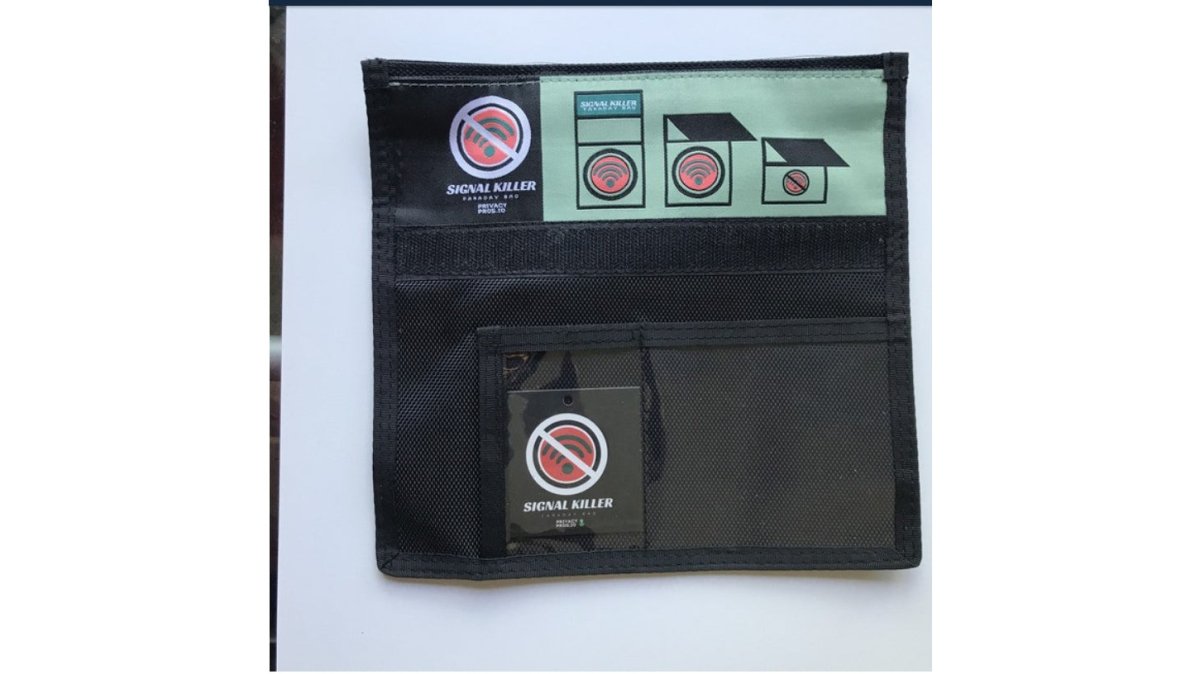
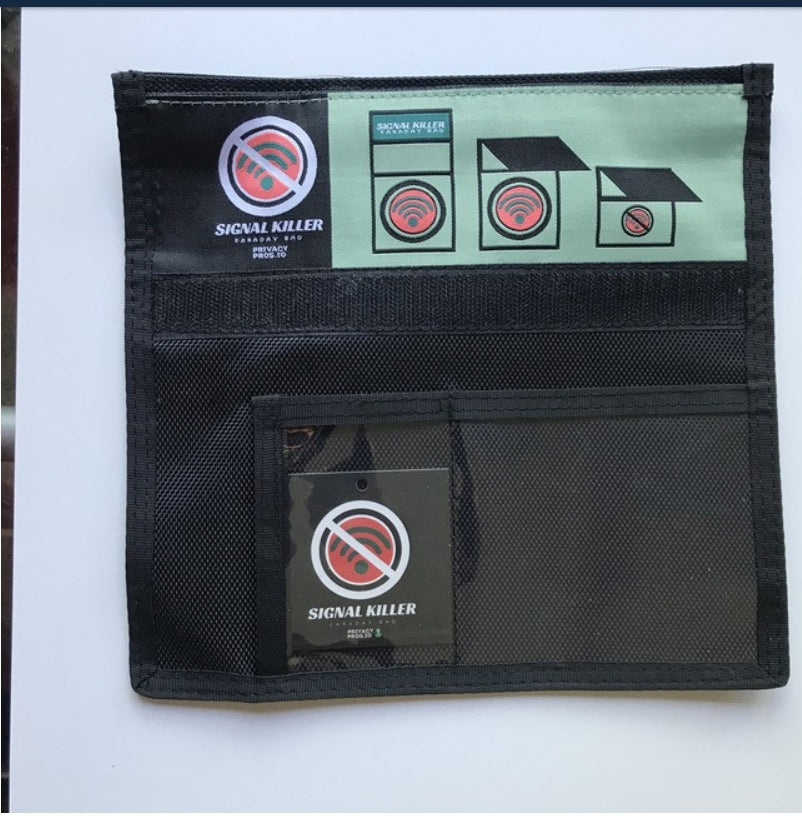
- Close the bag using its full intended closure, roll the top the specified number of times, press the fastener along its full width, and do not leave a corner folded back.
- Keep the bag in the same orientation and on the same table spot for every trial.
Step 3: Test Each Signal Type Separately
Each signal type needs its own check, because a bag can block one band and leak another. Run each test three times and record every result.
- Cellular (low band, 600-900 MHz): Call the test phone from the second phone. Record whether it rings, how many seconds to ring, and whether the call connects. A bag that blocks a 700 MHz LTE band may still leak a higher band, so also send a text and note delivery time.
- Cellular (mid band, 1.7-2.1 GHz): Repeat the call and text test. If your carrier aggregates bands, a single blocked band may not drop the connection entirely.
- Wi-Fi 2.4 GHz: Connect the test phone to a known 2.4 GHz network, confirm the connection is live, seal the bag, and check whether the phone reports the network as lost or unreachable. Then try to load a small page.
Step 4: Repeat and Compare
Run the full sequence three times in a row, then once more after a 10-minute pause. Record the results in a simple table:
| Signal type | Trial 1 | Trial 2 | Trial 3 | After pause |
|---|---|---|---|---|
| Cellular call | ||||
| Cellular text | ||||
| Wi-Fi 2.4 GHz | ||||
| Wi-Fi 5 GHz | ||||
| Bluetooth | ||||
| GPS |
A bag that blocks a signal in every trial is a stronger result than one that blocks it twice out of three. Consistency across trials is the closest a home test gets to a repeatable measurement.
Step 5: Interpret What You Saw
A pass/fail call is not the end of the analysis. Note which signal types were blocked cleanly, which leaked intermittently, and which were unaffected. A bag that blocks cellular but leaks Wi-Fi is still useful for some purposes and not others. Record the pattern, not just the verdict.
Common Ways a Home Test Goes Wrong
- Confusing weak coverage with shielding. If the phone had one bar outside the bag, a "blocked" result inside proves nothing. Always run the baseline first.
- Leaving a device setting on. Airplane mode, a dead SIM, or a Wi-Fi-only configuration will make a bag look better than it is. Confirm the radios are on before sealing.
- Testing only one frequency. A bag rated for 0.7-6 GHz may still have a weak spot at a specific band. Test each signal type separately.
What This Protocol Can and Cannot Tell You
This protocol can tell you whether a specific bag blocks specific signals on a specific phone in a specific location. It cannot produce a dB figure, cover every rated frequency, or be compared across bags tested in different rooms. For those, you need the lab methods described next.
 Trezor Model TView product
Faraday Bag Testing Methods: Home Checks Versus Accredited Lab Tests
Home checks are useful for a quick sanity test, but they use a single phone and no calibrated equipment, so they cannot produce a reliable dB figure or cover every frequency.
What a Lab Measures
A shielding-effectiveness test measures how much signal reaches a receiver inside the enclosure compared with the same receiver outside it. The result is expressed in decibels:
SE (dB) = 20 × log10 (E_outside / E_inside)
where E is the electric-field strength at a given frequency. If the field inside is one-hundredth of the field outside, shielding effectiveness is 40 dB; if one-thousandth, 60 dB. Because the scale is logarithmic, a 20 dB improvement means the leaked signal dropped by a factor of ten, not by 20 percent.
A lab run typically involves:
- A calibrated signal generator and antenna to produce a known field at a specified frequency.
- A calibrated receive antenna inside the bag, connected by fiber or a filtered feedthrough so the measurement cable does not itself become a leak path.
- A reference measurement with the bag open, followed by measurements with the bag closed, at each frequency of interest.
The Standards That Govern Lab Testing
IEEE 299-2006, "Standard Method for Measuring the Effectiveness of Electromagnetic Shielding Enclosures," is the reference most often cited for enclosure-level shielding measurements (IEEE SA). It defines the field probes, the frequency ranges, and the reference-measurement procedure. For materials rather than finished enclosures, ASTM D4935 covers planar shielding effectiveness using a coaxial transmission-line fixture. A vendor that cites a named standard is telling you which of these procedures produced the number.
Why a Phone Check Cannot Substitute
A phone reports bars, not field strength. It also aggregates bands, hands off between towers, and applies its own power control, so a dropped call inside a bag can mean shielding, weak coverage, or a network decision. A phone check is a yes/no observation at one moment; a lab test is a calibrated number across a defined frequency set.
| Method | What it tells you | Main limit |
|---|---|---|
| Single phone check | Whether common signals get through right now | No dB figure, one frequency at a time, sensitive to coverage |
| Repeated home runs with baseline | Consistency of blocking across trials | Still no calibrated measurement, limited frequency coverage |
| Accredited lab test (IEEE 299-2006) | Measured dB across set frequencies with a stated method | Costs more, takes longer, tests a sample not every unit |
| Material test (ASTM D4935) | Shielding effectiveness of the fabric itself | Does not capture seams, closures, or finished-bag assembly |
Reading a Lab Report
When a vendor publishes a lab figure, check four things: the frequency range, whether the number is an average or a minimum, the test standard cited, and whether the sample was a finished bag or a swatch of material. An average can hide a weak spot at one band; a minimum tells you the worst case. A material-only figure does not account for the closure, where most real-world leaks occur.
Where Each Method Fits
Use a home check to catch a bag that clearly fails, to compare two bags you already own, and to retest after wear. Neither replaces the other, and a bag that passes a home check is not thereby proven to meet its published dB rating, it is only shown to block the signals you tested.
Reading Signal Attenuation Figures and RF Attenuation Ratings
When you see an attenuation figure, check three things: the number, the frequency range and the test method. A "60dB" rating with no frequency is hard to use, because you do not know where it applies.
Also look for the test standard. A rating tied to a named method is more credible than a bare number. If a vendor cannot tell you how the figure was measured, treat it with caution.
Closure, Seam Wear and How Often to Retest Your Bag
A bag that tested well when new can leak later. The closure is the most common weak point.
Check the seams and closure regularly for cracks, lifting edges or worn fabric.
Good storage matters too. Keep the bag dry, avoid sharp objects inside, and do not fold it so tightly that the mesh creases.
Consistency is the goal. Retesting on a schedule tells you whether the bag still does its job.
Choosing a Tested Bag for Your Hardware Wallet at The Crypto Merchant
If you use a Bluetooth-enabled hardware wallet, a Faraday bag can help keep your phone from talking to it when you are not using it.
The Signal Killer Faraday Bag is available in our shop for $17.95. It seals with a full-width velcro closure.
If you also want to protect your recovery information, read our guide on how to protect crypto seed phrases and see our encrypted seed phrase storage options. For a broader look at why a bag matters, see our piece on why you need a Faraday bag for crypto security.
For a quick signal test, the Signal Killer Faraday Bag is ready to use. Check the closure and retest it regularly, and you will know it is working when you need it to.
Frequently Asked Questions
How effective is a Faraday bag?
Effectiveness depends on the bag's construction and how it is closed. Published claims such as the Signal Killer's average 60-80dB attenuation on WiFi, Bluetooth, cellular, GPS and RFID should be checked with a baseline test, because a bag only blocks signal when it is fully sealed and undamaged.
How do you test whether a Faraday bag works?
Start with a baseline: place a phone with a clear signal next to the bag and confirm full bars. Then place the same phone inside the closed bag, call it or send a message, and check whether the signal drops or the call fails. Repeat with Wi-Fi and Bluetooth, and try a GPS app. Run the same test three times and keep the sealed closure consistent so results can be compared. A phone that still shows signal inside the bag means the bag is not blocking that band.
Can a phone call get through a Faraday bag?
A properly sealed Faraday bag should prevent a phone from making or receiving calls, because the conductive mesh blocks cellular frequencies. If calls connect, the most likely causes are an open seam, a closure that is not fully rolled and fastened, or a bag that does not shield the frequencies your carrier uses. Check the closure first, then repeat the baseline test. Phones may also briefly show a signal bar before the connection fails, so judge by whether a call or message actually goes through.
How often should you retest a Faraday bag?
Retest a Faraday bag after any sign of wear, such as fraying fabric, a damaged seam, or a Velcro strip that no longer grips, and at regular intervals if you rely on it to protect a hardware wallet or other high-value device. Repeated folding and closing can wear the closure over time, and a bag that passed one year may fail later. Use the same baseline procedure each time so the results are comparable.


