

Table of Contents
- What Advanced Users Actually Need From a Ledger Alternative
- The Criteria That Separate Advanced Wallets From Beginner Ones
- Ledger Alternatives Compared: Pricing and Specs
- Trezor vs. Ledger: Where the Workflow Differences Show Up
- Tangem vs. Ledger: Is a Card-Style Wallet Right for You?
- Why an Open-Source Hardware Wallet Matters for Verification
- Advanced Workflows: PSBT, Coin Control, and Air-Gapped Signing
- Choosing a Hardware Wallet With Multisignature Support
- Conclusion
- Frequently Asked Questions
Last Updated: October 7, 2026
What Advanced Users Actually Need From a Ledger Alternative
A ledger alternative for advanced users is a hardware wallet built for people who treat self-custody as a technical practice: open firmware you can inspect, offline-verifiable signing, and software integration for real Bitcoin workflows.
At The Crypto Merchant, we have watched this category split in two: beginner wallets optimize for setup speed, advanced wallets for verification.
The threat model is different.
The Criteria That Separate Advanced Wallets From Beginner Ones
Advanced hardware wallets are judged on five things: firmware transparency, offline signing, software compatibility, backup design, and multisignature support. Beginner wallets are judged on unboxing speed.
That gap explains why so many comparisons miss the point: they rank by price and coin count, then stop. Coin count is irrelevant if the device cannot produce a PSBT or connect to Electrum.
Our evaluation framework:
- Firmware auditability: Can independent researchers read the code?
- Air-gapped signing: Can the device sign without ever touching a USB cable?
- Software integration: Does it work with Electrum, Specter, or Sparrow?
Ledger Alternatives Compared: Pricing and Specs
The strongest options pair open-source firmware with hardware that supports advanced signing. Pricing ranges from under fifty dollars to roughly one hundred fifty dollars, and the cheapest device here is not the least capable.
| Wallet | Price | Firmware | Standout Feature | Best For |
|---|---|---|---|---|
 BitBox02 Multi Edition |
$149.99 | Open source | microSD seed backup, coin control | Bitcoin privacy workflows |
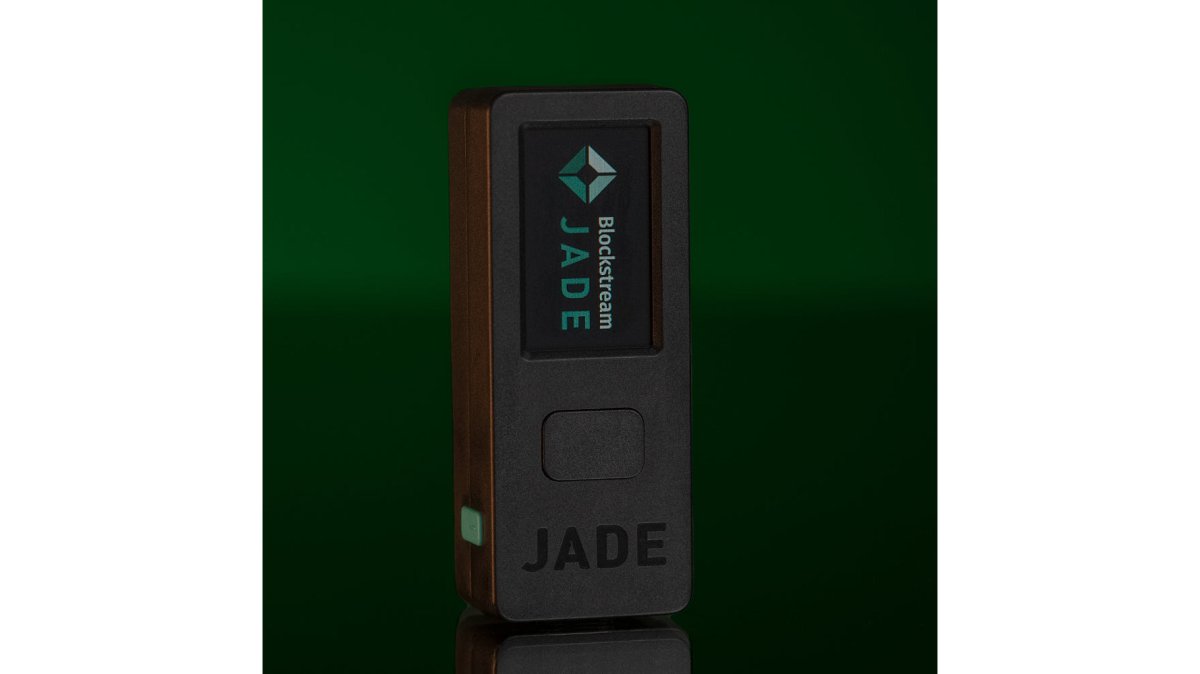
| Blockstream Jade | $79.99 | Open source | Air-gapped sign-in, address randomization | Air-gapped Bitcoin signing |
| Trezor Model T | $59.00 | Open source | Color touchscreen, on-device confirmation | Touchscreen verification |
 SecuX W20 |
$109.99 | Tamper-proof | Bluetooth, 2.8-inch touchscreen | Multi-device access |
| KeepKey | $46.99 | Verified firmware | 3.12-inch OLED display | Large-screen confirmation |
Two things stand out: the BitBox02 and Blockstream Jade are the only devices here advertising open-source firmware and advanced privacy features, and the Trezor Model T undercuts most of the field while still offering on-device confirmation.

What the Spec Sheet Does Not Tell You
Price and screen size are the easy columns. The ones that matter are rarely printed:
- PSBT support: Can it sign a Partially Signed Bitcoin Transaction from an external coordinator, or only inside its own app? Trezor, BitBox02, and Blockstream Jade sign PSBTs from third-party coordinators; an in-app-only signer cannot join an air-gapped or multisig quorum.
- Coin control granularity: Can you select, freeze, and label individual UTXOs? BitBox02 exposes this via its app and Electrum, Trezor via Trezor Suite and Electrum, Jade via its app and Sparrow.
- Firmware verification method: Open source is the starting line. Ask whether the vendor publishes reproducible builds and a signed release manifest; Trezor and BitBox02 publish firmware hashes you can check.
How to Read the Table for Your Workflow
Single-signature cold storage with occasional spends: the Trezor Model T at $59.00 is the value pick, open firmware, on-device confirmation, PSBT support via Electrum.
Air-gapped QR signing: the Blockstream Jade at $79.99 is built for it out of the box and handles Liquid assets alongside Bitcoin.
Privacy-focused UTXO management with a personal node: the BitBox02 Multi Edition at $149.99 is the only device here shipping microSD seed backup and first-class coin control together.
If you want the full technical breakdown of how each device handles Bitcoin-specific workflows, the BitDegree guide to verifiable wallet safety walks through pairing devices with Electrum and Specter for coin control.
Trezor vs. Ledger: Where the Workflow Differences Show Up
Trezor and Ledger both sign transactions securely; the difference is how much of the workflow lives on the device versus the companion app.
Trezor leans toward transparency: the Model T runs open-source firmware, includes a color touchscreen for on-device confirmation, and works with Trezor Suite plus third-party apps.
 Trezor Model TView product

The Model T ships with a USB-C cable, two backup cards, a magnetic dock, and a start-up guide.
Tangem vs. Ledger: Is a Card-Style Wallet Right for You?
Card-style wallets trade a screen for convenience. A card wallet with no display cannot show you transaction details before you sign.
For advanced users, that missing screen is a real limitation: on-device confirmation exists so you can verify the destination address and amount on hardware the attacker does not control.
Card wallets still make sense in specific cases:
- Small balances you move frequently
- A secondary wallet for spending, not savings
- Users who value portability above all else
They make less sense for cold storage of a large portfolio, where offline signing and address verification matter more than portability.
For long-term self-custody with verifiable signing, a device with a screen and open firmware is the better fit. The SecuX W20, for example, uses a 2.8-inch color touchscreen for physical confirmation, with a secure element protecting private keys.

Why an Open-Source Hardware Wallet Matters for Verification
An open-source hardware wallet publishes its firmware so independent researchers can inspect the code that generates your keys and signs your transactions.
This is not abstract: self-custody's entire value rests on removing trusted third parties.
Open-source firmware gives you three concrete advantages:
- Independent review: Security researchers can find flaws before attackers do
- Reproducible builds: You can confirm the firmware you install matches the published source
- Longevity: If the company disappears, the community can maintain the code
The BitBox02 goes further with a fully open-source codebase and a design that stores your recovery seed on an included microSD card, removing the messy-handwriting failure point.
BitBox02 Hardware Wallet (Multi Edition) by Shift Crypto →
Advanced Workflows: PSBT, Coin Control, and Air-Gapped Signing
Three workflows separate advanced users from everyone else: PSBT signing, UTXO coin control, and air-gapped operation. Each protects something a basic setup leaves exposed.
PSBT: Building, Signing, and Broadcasting in Three Places
PSBT stands for Partially Signed Bitcoin Transaction, a standardized data format, not a product feature, which is why it works across vendors' wallets. Three stages:
- Construction (online machine): A coordinator, Electrum, Specter Desktop, or Sparrow, selects inputs and outputs and produces a PSBT file or QR code. It knows your addresses but never sees your private keys.
- Signing (offline device): Move the PSBT to the hardware wallet via microSD, USB, or QR code. The device displays the destination address and amount on its own screen; you confirm physically, and it returns a partially signed PSBT.
- Broadcast (online machine): The coordinator finalizes the signatures and broadcasts to the network.
The security property: your private key never touches an internet-connected machine, and the address you approve is the one the device shows you, not one a compromised computer substituted.
A common pattern runs the coordinator on an air-gapped machine, then moves the finalized transaction to a networked machine only for broadcast, the setup most often recommended for large holdings.
Coin Control: Labeling UTXOs Before You Need To
Coin control lets you choose which UTXOs fund a transaction. Without it, your wallet may merge outputs from different sources, linking addresses that should stay separate on-chain.
The workflow that matters is labeling, not just selecting:
- Label every UTXO at receipt. Tag it with its source, 'KYC exchange withdrawal,' 'P2P trade,' 'mining payout,' 'gift.' Labels live in your coordinator, not on-chain, so they cost nothing and leak nothing.
- Freeze UTXOs you do not want spent. A frozen UTXO is excluded from automatic selection, preventing accidental merges of KYC-linked and private outputs.
- Select inputs manually for sensitive spends. Choose UTXOs whose labels match the purpose; do not let the wallet pick for you.
The BitBox02 includes coin control and personal node connections, protecting privacy at the transaction level; Electrum and Sparrow expose the same controls for Trezor and Jade users. The device matters less than the coordinator you pair it with.
Air-Gapped Signing: QR Codes, microSD, and the Real Trade-off
Air-gapped signing means the device never connects to a computer or network. Data moves by QR code, microSD card, or manual transcription.
The Blockstream Jade supports air-gapped sign-in and address randomization, handling Bitcoin and Liquid with an open-source codebase. The BitBox02 supports microSD-based PSBT transfer.
A common mistake is assuming air-gapped means slow, scanning a QR code takes seconds and the security gain is substantial.
Supply-Chain Verification: The Step Almost Nobody Documents
Before any of the above matters, you need to know the device in your hand is the device the manufacturer shipped. Advanced users treat this as a procedure, not a vibe:
- Buy from an authorized distributor that inspects units and does not drop-ship from third-party marketplaces.
- Inspect the packaging for tamper-evident seals and confirm the seal matches the vendor's published design.
- Generate the seed yourself on the device. A device arriving with a pre-written seed phrase is compromised, no exceptions.
- Verify the firmware hash against the vendor's published release manifest before entering any funds.
- Run a small test transaction to a fresh address and confirm it on the device screen before moving your full balance.
Threat Modeling Before You Buy
The workflow you need depends on the threat you are defending against. Remote malware calls for air-gapped signing; chain analysis, coin control and a personal node; physical coercion, multisig with geographically separated keys; supply-chain tampering, a verified distributor and firmware hash check.
Most advanced users need two or three of these, not all four. Writing down which threats apply to you, before comparing devices, turns a wallet purchase into a security architecture.
Choosing a Hardware Wallet With Multisignature Support
A hardware wallet with multisignature support requires multiple keys to authorize a transaction, removing the single point of failure a lone seed phrase creates.
The tradeoff is operational complexity. According to EarnPark's 2026 cold wallet comparison, a three-device multisignature configuration eliminates a single point of failure but demands significantly more setup and ongoing discipline.
That complexity is manageable if you plan for it:
- Decide your quorum before buying hardware (2-of-3 is the common starting point)
- Store each key in a separate physical location
- Test recovery with a small amount before moving your full balance
Multisignature is not for everyone. With a modest balance and infrequent moves, a single well-backed-up device is simpler and safer than a multisig setup you do not fully understand.
Conclusion
The hardest part of choosing a ledger alternative is not picking a device but matching its workflow to your actual threat model, a step most buyers skip entirely.
The Crypto Merchant carries hardware wallets built for exactly this decision. As an authorized distributor of Trezor and SecuX hardware wallets, we stock devices supporting open firmware, on-device confirmation, and advanced signing workflows.
Browse our hardware wallet collection and choose the device that fits how you actually secure your assets.
Frequently Asked Questions
Which Ledger alternative is best for advanced users?
For advanced users, the BitBox02 Multi Edition stands out with coin control and personal node connections built in. The Trezor Model T offers on-device confirmation and Trezor Suite support, while the Blockstream Jade provides air-gapped sign-in and address randomization. Each suits different workflows, so match the device to whether you prioritize Bitcoin-only tooling, multi-coin support, or open-source verification.
Which hardware wallets offer open-source firmware?
The BitBox02, Trezor Model T, and Blockstream Jade all use open-source firmware that anyone can inspect. Open-source code lets independent researchers audit how private keys are handled and confirm there are no hidden backdoors. For advanced users, this transparency is often the deciding factor when picking a Ledger alternative.
How do Ledger alternatives handle seed phrase backups?
Approaches vary by device. The BitBox02 automatically backs up your seed phrase to an included microSD card, which reduces transcription errors. Trezor Model T includes two wallet backup cards for written recovery. SecuX W20 supports BIP39-compliant recovery with 12, 18, or 24-word phrases. Whichever you choose, store the backup separately from the device.
Can you use a hardware wallet with multisignature support?
Yes. Devices like the Trezor Model T and BitBox02 work with multisig setups through compatible software. A 2-of-3 configuration using multiple devices removes a single point of failure, though it requires more setup and careful key management. Advanced users managing large holdings often accept that trade-off for stronger protection.
What should advanced users compare when choosing a hardware wallet?
Focus on firmware transparency, PSBT and coin control support, air-gapped signing capability, multisig compatibility, and how the device handles seed backups. Price matters less than workflow fit. The BitBox02 at $149.99, Trezor Model T at $59.00, and Blockstream Jade at $79.99 each serve different priorities, so match the device to how you actually transact.


