

Table of Contents
- What a Hardware Wallet Actually Protects
- Should I Use a Hardware Wallet: The Portfolio Value Threshold
- Hardware Wallet Cost vs. Exchange Wallet Security
- Hardware Wallet Cost: Breaking Down the Real Investment
- Hardware Wallet Pros and Cons: A Practical Assessment
- Comparing Your Options: Entry-Level to Premium Devices
- When a Hardware Wallet Becomes Essential
- Frequently Asked Questions
Last Updated: October 12, 2026
What a Hardware Wallet Actually Protects
A hardware wallet is a physical device that stores your private keys offline, away from internet-connected computers and smartphones, and whether a hardware wallet worth the investment depends on your holdings and security needs. It generates and stores the cryptographic keys needed to access your digital assets, isolated from networks where hackers operate.
The core protection is straightforward: your private keys never touch the internet. When you approve a transaction, the device signs it internally and only sends the signed transaction to the blockchain.
According to ACM Digital Library research on cryptocurrency wallet security, hardware wallets were widely viewed as the most secure option for crypto storage. The research also found that users considered them worthwhile mainly for larger holdings. This distinction matters: the security benefit is absolute, but the financial justification depends on what you're protecting.
Should I Use a Hardware Wallet: The Portfolio Value Threshold
Whether a hardware wallet is worth the money is not a single dollar cutoff.
1. Portfolio value. The larger the balance, the easier the math. A $59 device protecting $5,000 is a 1.2% one-time cost. The same device protecting $500 is a 12% cost, which is hard to justify on security alone.
2. Exposure and transaction habits. If you buy monthly and hold, signing friction is negligible. If you trade daily or use DeFi protocols requiring frequent approvals, the time cost compounds, and the break-even shifts because you pay in minutes, not just dollars.
3. Risk tolerance and recovery capability. A hardware wallet does not eliminate risk; it moves it.
4. Alternatives. Exchange custody is a real option. A regulated exchange with insurance, withdrawal allowlists, and strong account security may be safer than poorly managed self-custody.
A practical break-even framework:
| Balance | Typical recommendation | Why |
|---|---|---|
| Under $500 | Optional | Device cost is a large percentage of holdings; exchange custody with strong account security may be sufficient. |
| $500-$2,000 | Personal call | Depends on whether you hold long-term and whether losing the balance would hurt. |
| $2,000-$10,000 | Usually worth it | Device cost is small relative to the asset; cold storage meaningfully reduces remote theft risk. |
| Above $10,000 | Standard practice | The cost is negligible; consider multisignature or a second device for redundancy. |
Hardware Wallet Cost vs. Exchange Wallet Security
Many people keep crypto on exchanges (like Coinbase or Kraken) instead of moving it to a hardware wallet. The exchange holds your private keys, not you.
Exchange custody is convenient: instant trading, quick withdrawals, no device to lose. But you're trusting the exchange's security.
A hardware wallet costs $30-$100 upfront and shifts security responsibility entirely to you. You control the keys: no exchange hack can steal your funds, no company can freeze your access.
The question isn't which is "safer" in absolute terms, it's which risk you prefer. Exchange risk is institutional; hardware wallet risk is personal, depending on you not losing the device or forgetting the recovery phrase.
For long-term holding, hardware wallets shift the risk to something you control. For active trading, exchanges are more practical. Many experienced investors use both: a hardware wallet for long-term positions and an exchange account for trading.
Hardware Wallet Cost: Breaking Down the Real Investment
The sticker price is only the first line item. Total cost of ownership includes the device, backup materials, replacement, shipping, and setup and recovery time.
Device cost. Entry-level options like the Trezor Model One start at $29. Mid-range devices like the Ledger Nano S Plus and Trezor Model T run $59. Premium options like the Ledger Nano X cost $99.


Backup materials. You will write down a 24-word recovery phrase. Paper is free but vulnerable to fire, water, and loss.
Replacement cost. Devices fail, get lost, or get damaged. A backup recovery phrase lets you restore funds on a new device, but you still pay for it.
Shipping and handling. Shipping is usually a few dollars; expedited or international costs more.
Time cost. Setup takes 30 to 45 minutes: unbox, initialize, write down the recovery phrase, verify it, and install the companion app. Recovery can take an hour or more and is error-prone.
Total realistic cost over five years: $29 to $99 for the device, plus $0 to $30 for backup materials, plus one replacement ($29 to $99), plus shipping, roughly $15 to $45 per year amortized.
| Component | Entry-Level | Mid-Range | Premium |
|---|---|---|---|
| Device | $29 | $59 | $99 |
| Backup materials | $0-$10 | $0-$30 | $0-$30 |
| Replacement (5 yr) | $29 | $59 | $99 |
| Shipping | $5-$15 | $5-$15 | $5-$15 |
| Setup time | 30-45 min | 30-45 min | 30-45 min |
| Approx. annual cost | $15-$25 | $25-$35 | $35-$45 |
How this compares to the alternatives.
- Exchange custody. Many exchanges charge no explicit custody fee, but earn from spreads, withdrawal fees, or staking. The trade-off is counterparty risk: if the exchange is hacked, becomes insolvent, or freezes withdrawals, your funds are at risk. You pay in control, not dollars.
- Software wallet. Free to download, but the private keys live on an internet-connected device. Malware and phishing can steal keys. The cost is zero; the risk is higher.
- Multisignature setup. Requires multiple keys to approve a transaction, often using two or more hardware wallets or a collaborative custody service. It costs two to three times a single device and adds coordination overhead, but reduces single-point-of-failure risk, common for larger holdings or shared accounts.
A cheap hardware wallet from an unverified reseller can be tampered with before it reaches you. Buy directly from the manufacturer or a verified retailer, and always initialize the device yourself and generate a new recovery phrase rather than using one that came with the device.
Hardware Wallet Pros and Cons: A Practical Assessment
Pros:
Private keys stay offline, eliminating the attack surface of internet-connected wallets.
 Trezor Model OneView product
You control your assets directly. No company can freeze your account, go bankrupt, or restrict access. You own the keys, you own the cryptocurrency.
Long-term security is strong. Store the device and recovery phrase safely and your funds are protected for years without active maintenance or password changes.
Cons:
Device loss is permanent. Milk Road's hardware wallet guide identifies misplacing the device as a drawback that can result in permanently losing access to crypto assets.
Recovery is difficult.
Setup requires attention to detail. Writing down the recovery phrase correctly, storing it securely, and not losing it are entirely your responsibility. One mistake and recovery becomes impossible.
Transactions are slower. Signing on a hardware wallet takes longer than clicking approve in a software wallet. For frequent traders, this friction adds up.
Comparing Your Options: Entry-Level to Premium Devices
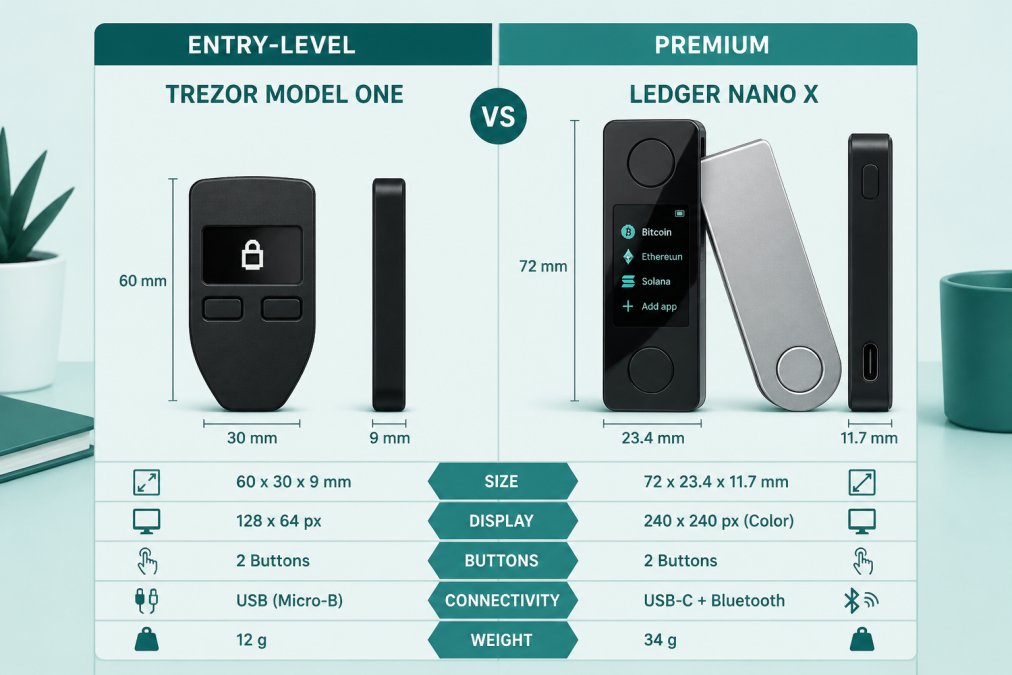
Budget-Friendly Entry Point
The Trezor Model One at $29 is the lowest-cost hardware wallet that doesn't compromise on security. It has a monochrome OLED display, two physical buttons, and open-source software, with Trezor Suite walking you through setup and backup.
The trade-off is interface simplicity: the small screen and button navigation feel dated, and the friction is noticeable if you manage multiple coins or approve frequent transactions. For a first hardware wallet storing Bitcoin or Ethereum long-term, it's perfectly adequate.
Best for: Beginners with small to moderate holdings who want to minimize cost.
Mid-Range Balance of Features and Price
The Trezor Model T ($59) and Ledger Nano S Plus ($59) occupy the practical middle ground. Both have color touchscreens, support thousands of coins, and include USB-C. The Model T has a magnetic dock; the Nano S Plus is more compact.
 Ledger Nano S PlusView product
The Model T uses open-source Trezor Suite; the Nano S Plus uses Ledger Live, which adds staking and portfolio tracking. Neither has Bluetooth, so you'll need a cable.
Best for: Growing portfolios and investors who want a balance of security, usability, and cost.
Premium Features for Larger Holdings
The Ledger Nano X ($99) is the premium option, adding Bluetooth so you can manage your wallet from an iOS or Android phone via Ledger Live and approve transactions without a cable, convenient for frequent traders or large multi-coin positions.
 Ledger Nano XView product
The Nano X supports up to 100 coin applications simultaneously, practical for diverse assets, and its larger touchscreen handles complex transactions smoothly. For portfolios above $10,000 or regular trading, the extra $40 often pays for itself in reduced friction.
Best for: Active traders, large portfolios, and investors who value mobile access and broad coin support.
When a Hardware Wallet Becomes Essential
A hardware wallet becomes essential when your cryptocurrency holdings represent meaningful wealth, holdings you'd genuinely regret losing. The hardware wallet market is projected to reach $2.25 billion by 2031, growing at a 25.59% compound annual growth rate, according to Mordor Intelligence hardware wallet market analysis.
For holdings above $5,000, a hardware wallet worth the cost is standard practice among experienced investors; above $10,000, it's nearly universal. Below $1,000, it's optional, the decision depends on your risk tolerance and how much peace of mind is worth to you.
The real inflection point isn't a fixed dollar amount. It's when you stop treating your cryptocurrency as an experiment and start treating it as a long-term asset, when the security benefit of offline storage outweighs the setup friction and cost.
A hardware wallet is worth the money if you're holding cryptocurrency you'd genuinely regret losing or if you plan to hold for years.
Frequently Asked Questions
Should I use a hardware wallet if I only hold a small amount of crypto?
For small holdings, a hardware wallet may not justify the upfront cost. Research shows many users consider them worthwhile primarily for larger amounts where losing access would cause significant financial harm. If your portfolio is under $500, a reputable software wallet with strong security practices may be sufficient. As your holdings grow, the security benefits of a hardware wallet become more compelling relative to the cost.
Is a hardware wallet safer than keeping crypto on an exchange?
Yes, hardware wallets offer significantly stronger security than exchange storage. With a hardware wallet, you control your private keys completely offline, eliminating the risk of exchange hacks or platform failures. Exchanges remain vulnerable to cyberattacks and internal breaches. However, hardware wallets introduce different risks: device loss, damage, or misplaced recovery phrases can result in permanent asset loss. The security advantage is real, but it requires responsible device and backup management.
What's the total cost of owning a hardware wallet beyond the device price?
The device itself ranges from $29 to $99, but total cost of ownership includes backup storage materials, potential replacement devices if lost or damaged, and time investment in setup and learning. Most users spend $50-$150 total in their first year. There are no ongoing subscription fees for most hardware wallets. For long-term holders, this one-time investment is typically far cheaper than the insurance or losses associated with exchange hacks or software wallet compromises.
Can you lose your crypto permanently if a hardware wallet breaks or gets lost?
Yes, if you lose the device without a backup recovery phrase, your crypto is permanently inaccessible. This is a genuine drawback. However, hardware wallets are designed to prevent this: they generate a recovery phrase during setup that you must store separately and securely. If the device breaks, you can restore your wallet on any compatible hardware wallet using that phrase. The key is treating your recovery phrase backup with the same security as your private keys, store it offline in a secure location.


