

Last Updated: November 17, 2026
Quick Summary
Protect a hardware wallet during hardware wallet shipping by sealing it in a tamper-evident bag, padding it inside a rigid box, and using a double-box setup. Inspect the packaging and seals on arrival, and keep the recovery phrase out of the parcel entirely.
- Seal the device in a tamper-evident bag and record the bag serial number before packing.
- Pad at least one inch on all six sides, using a double-box setup for high-value shipments.
- Photograph the box, seals, and label on arrival, and stop if anything looks altered.
- Choose signature-required delivery with declared-value coverage and keep the receipt as proof of value.
- Never ship the recovery phrase with the device; store it separately and offline.
Table of Contents
- Why Shipping a Hardware Wallet Carries Real Risk
- How to Check a Hardware Wallet for Tampering on Arrival
- Physical Security: Tamper-Evident Packaging and Seals
- Choosing Tracked, Insured, and Signature-Required Delivery
- Shipping a Hardware Wallet Securely Without Exposing Your Identity
- Recovery Phrase Security: Never Ship It With the Device
- Buying a Hardware Wallet Safely Online and What to Do After a Problem Parcel
- Your Next Step: Set Up Your Wallet Only After Verification
- Frequently Asked Questions
 Ledger Nano X PurpleView product
Why Shipping a Hardware Wallet Carries Real Risk
A hardware wallet is one of the safest places to keep crypto, but during hardware wallet shipping, the moment it leaves your hands, you lose some control. Learning how to protect a hardware wallet during shipping closes that gap.
Shipping creates a few specific openings. A parcel can sit in a warehouse, pass through several handlers, or be opened and resealed before it arrives. Anyone with access to the box could swap the device or slip something inside.
Here is what makes shipping risky:
- The parcel passes through many hands before it reaches you
- The outer box may be opened and closed without anyone noticing
- Shipping labels and sender details can reveal who owns the wallet
- A delayed or lost parcel can leave you guessing about its condition
For the device itself, treat every hardware wallet shipping event as untrusted until you verify it. The sections below explain how.
How to Check a Hardware Wallet for Tampering on Arrival
Before you touch the device, inspect the packaging. Do this where you can see the box clearly, ideally on a clean table. Check for crushed corners, re-taped seams, or a box that looks lighter or heavier than expected.
Next, look at any seals. Tamper-evident seals should be intact, with no lifted edges, no sign of peeling, and no mismatched colors or serial numbers.
A simple check order helps:
- Photograph the box and shipping label as you receive them
- Look for signs the box was opened and resealed
- Confirm the seal numbers match your records
- Open the packaging only after these checks pass
If anything looks wrong, stop. Do not set up the device. Contact the seller and keep the packaging as evidence.
 Ledger Nano S PlusView product
Physical Security: Tamper-Evident Packaging and Seals
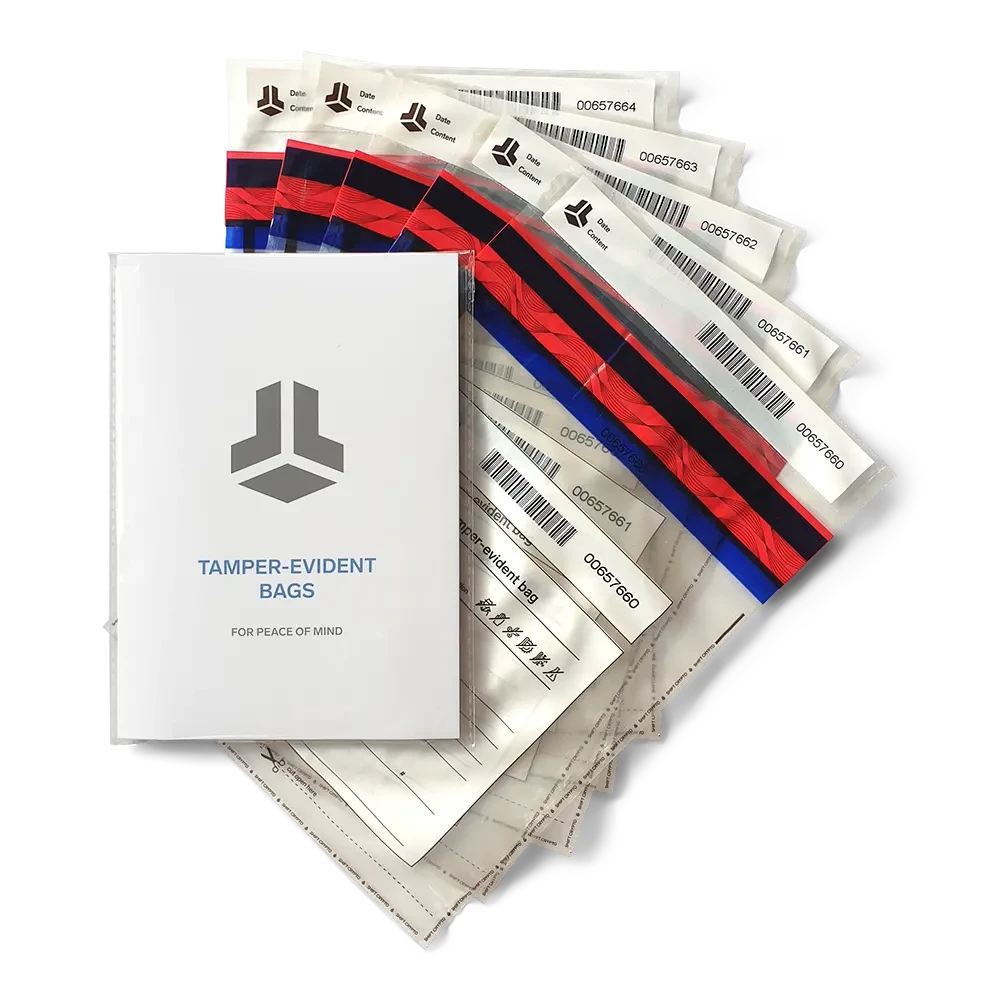
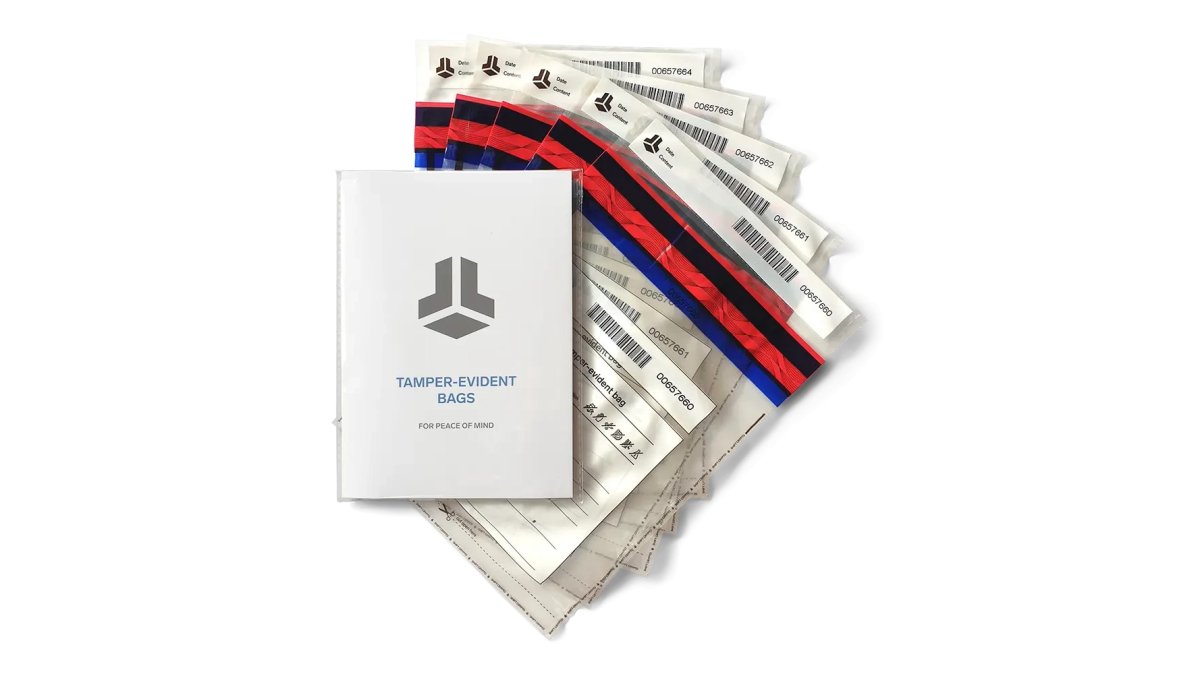
Tamper-evident packaging gives you a clear sign when someone has tried to access your wallet. A good seal shows damage if it is lifted, cut, or replaced.
The BitBox Tamper-Evident Bags 5 Pack ($14.99) is one option for sealing a device and its backup materials. Each bag is designed to show visible damage if it is opened.
A Step-by-Step Packing Checklist for Mailing a Hardware Wallet
Work on a clean, flat surface, and photograph each stage so you have a record if something goes wrong.
- Set up a clean workspace. Clear the table, keep pets away, and lay out every supply before you touch the device. A lint-free cloth and a small tray keep screws and bags from rolling away.
- Seal the device first. Place the hardware wallet inside a tamper-evident bag, press out excess air, seal it, and write the bag serial number in your records. Do not put the recovery phrase in this bag or anywhere in the parcel.
- Add a rigid inner layer. Wrap the sealed bag in a layer of bubble wrap or closed-cell foam, then place it in a small rigid box so the device cannot flex. A device that bends in transit can arrive with a cracked screen or a loose connector, which looks like tampering even when it is not.
- Cushion on all six sides. Put at least one inch of padding between the inner box and the outer carton on every side. Crumpled paper settles; foam sheets and air pillows hold their shape better over a multi-day trip.
- Use a double-box setup for high-value shipments. Place the cushioned inner box inside a larger outer carton with additional padding. The outer box takes the handling damage, and the inner box keeps the seal intact.
- Seal every seam with reinforced tape. Run packing tape across the top, bottom, and side seams, then wrap the corners. A box that is taped only across the top can pop open at a corner during sorting.
- Label the outside plainly. Use a printed label with the destination address and a generic return address. Do not write "crypto," "wallet," "hardware," or a product name on the outside of the box.
- Record the handoff. Note the tracking number, the drop-off time, and the counter location. If you hand the parcel to a clerk, ask for a receipt; if you use a drop box, keep the scan record.
Watch out: a tamper-evident bag sealed over a device that is still in its retail box can hide a swapped device inside the retail packaging, so open and inspect the retail box before you seal anything.
The Casematix Hardware Wallet Waterproof Hard Case ($22.99) offers foam padding and a sealed lid for transport. Its listing describes a waterproof O-ring lining and shock-resistant interior. The Signal Killer Faraday Bag ($17.95) is designed to block wireless signals such as Bluetooth, WiFi, and cell signals.
Choosing Tracked, Insured, and Signature-Required Delivery
How a parcel travels matters as much as how it is packed. The major carriers offer overlapping but not identical services, and the differences matter when the contents are a hardware wallet.
- Tracking. Every major carrier offers end-to-end tracking on domestic parcels. The useful detail is scan granularity: some budget services show only acceptance and delivery, while priority services show intermediate facility scans. Intermediate scans are what let you spot a parcel that stalls for several days.
- Insurance or declared value. Carriers sell additional coverage above the default liability limit, and the declared value must match what you would actually pay to replace the device. Keep the receipt and the declared-value record; a claim without proof of value is routinely denied.
- Signature confirmation. Signature-required delivery prevents a driver from leaving the parcel at the door. Adult-signature options go further and require someone at the address to sign. Choose the strictest option the carrier offers for the destination.
- Delivery controls. Most major carriers let you set a hold at a staffed facility, redirect to a retail pickup point, or require an in-person handoff. Set these controls before the parcel enters the delivery network, not after a missed attempt.
- Address type. A staffed address where someone can receive the parcel during business hours beats a residential doorstep. A PO box or private mailbox works for some carriers but limits signature and insurance options, so confirm before you ship.
A common pattern is to pair a mid-tier tracked service with signature confirmation and declared-value coverage rather than paying for the fastest service. Speed matters less than a documented chain of custody.
What to Do After a Delayed, Lost, Opened, or Damaged Parcel
The device and the recovery phrase carry different risk, and the response should separate them.
- Delayed. Check the scan history for the last confirmed location, then open a trace with the carrier. Do not assume the device is compromised just because it is late; a stalled scan usually means a sorting delay, not theft.
- Lost. File a claim with the carrier and notify the seller in writing. If the parcel contained a device you had already set up, treat the recovery phrase as the only thing that protects the funds, and confirm the phrase is stored safely and offline.
- Opened or resealed. Stop. Do not set up the device. Photograph the box, the seals, and the label, keep the packaging as evidence, and contact the seller. A device that arrives in a resealed box is untrusted until the seller replaces it.
- Damaged. Photograph the damage before opening the inner packaging, then inspect the device for cracks or loose parts. A physically damaged device should be replaced rather than set up, because damage can mask tampering.
Watch out: never restore a wallet from a recovery phrase that arrived with the parcel, and never enter a phrase provided by a seller, carrier, or support agent, a legitimate recovery phrase only comes from a device you initialized yourself.
If a parcel is delayed, ask the carrier for an updated scan history and a written trace reference. Keep that reference with your order records so a claim or a seller dispute does not depend on memory.
The table below summarises the delivery options the article compares, so you can match each one to the risk it addresses.
| Delivery option | What it does | Key note |
|---|---|---|
| Tracking | Shows where the parcel is | Look for intermediate facility scans |
| Insurance or declared value | Covers loss above default liability | Keep the receipt as proof of value |
| Signature confirmation | Stops drop-off at the door | Choose the strictest option offered |
| Delivery controls | Holds or redirects the parcel | Set before the parcel enters the network |
| Address type | Determines available signature and insurance options | Confirm before shipping to a PO box |
Shipping a Hardware Wallet Securely Without Exposing Your Identity
Your shipping label can reveal more than you expect. Names, addresses, and order details can tie a wallet to your identity. Keep that information to the minimum the carrier needs.
Here is how to reduce exposure:
- Use a business or PO box address where it is allowed
- Avoid writing crypto-related terms on the outside of the box
- Keep sender details generic when the seller allows it
- Do not share tracking numbers on public forums
Privacy matters most for large holdings. If someone links your name to a shipment, they may target you.
Recovery Phrase Security: Never Ship It With the Device
Your recovery phrase should never travel in the same box as the wallet. Anyone who holds both the device and the phrase can access your funds.
Ship the device, and handle the recovery phrase separately. Many experienced users write the phrase on paper, store it in a sealed bag, and keep it at home or in a secure location. Never photograph it, type it into a phone, or send it by email.
For a complete plan, read our guide on how to protect crypto seed phrases.
Buying a Hardware Wallet Safely Online and What to Do After a Problem Parcel
Buy only from an authorized seller. The Crypto Merchant is an authorized distributor of Trezor and SecuX hardware wallets, and guarantees the authenticity of its products. Before buying anywhere else, check whether the seller is an authorized reseller on the manufacturer's website.
If a parcel is delayed, lost, opened, or damaged, take these steps:
- Stop before setting up the device
- Contact the seller with photos and tracking details
- Ask the carrier for a written investigation
- Do not restore a wallet from a recovery phrase you did not create yourself
Never trust a device that arrives with signs of tampering. Replacing it costs far less than losing your holdings.
Your Next Step: Set Up Your Wallet Only After Verification
Shipping a hardware wallet safely comes down to three habits: inspect the packaging, keep the recovery phrase apart from the device, and verify everything before setup. Shop for your hardware wallet and sealing supplies at The Crypto Merchant, the authorized distributor of Trezor and SecuX wallets.
Frequently Asked Questions
How can I tell if a hardware wallet package has been tampered with?
Check the outer box and inner seals before opening. Look for broken or misaligned tamper-evident stickers, crushed corners, resealed tape, or packaging that looks replaced. Compare the device serial and seal numbers against the manufacturer's setup instructions. If anything looks altered, do not set up the device. Contact the seller in writing, document the condition with photos, and request a replacement from an authorized reseller before storing any funds on it.
Is it safe to buy a hardware wallet online and have it shipped?
It can be, if you buy from an authorized reseller. The Crypto Merchant is an authorized distributor of Trezor and SecuX hardware wallets. Manufacturers generally publish lists of authorized resellers, so you can verify a seller before ordering. Choose tracked, signature-required delivery, and check the package on arrival as described above.
Should I insure a hardware wallet shipment?
Insurance is worth considering for any high-value parcel. Choose a carrier or service that offers tracking and declared-value coverage, and require a signature at delivery so the package is not left unattended. Insurance covers the replacement cost of the device, but it does not restore funds if a wallet is compromised, so the seal checks and recovery phrase practices in this guide still matter most.
Should I ship a hardware wallet with its recovery phrase?
No. Never send your recovery phrase with the device, by email, or through any messaging app. Anyone who has both the wallet and the phrase can access your funds. Write the phrase down by hand after setup, store it offline in a secure location, and keep it separate from the device. If you need to move a wallet, ship only the device and set up a new recovery phrase on arrival.


